
Purpose
To explain the process of manually adding a new tutor group.
Covers: Creating a new tutor group.
This section does not cover: Removing groups and adding new students.
When to Do This
After removing leavers, but before adding new students if adding them manually.
Instructions
A borrower cannot be enrolled without belonging to a tutor group, therefore it is vital that the tutor group they will be a member of is in place first.
This only applies to adding borrowers/groups manually, when using a CSV file to import data the groups are automatically created.
Click 'Tutor Groups' on the left menu. Alternatively, select 'Database' from the menu at the top of the page then select 'Tutor Groups' from the list.
Click 'New' under Records on the right menu.
A blank tutor group record card will then appear.
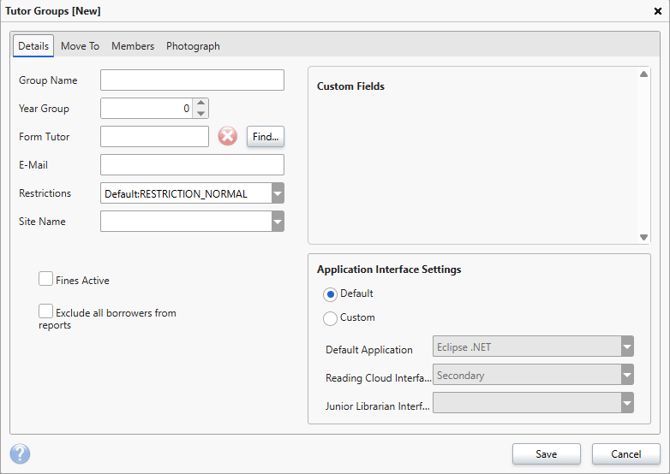
There are 2 mandatory fields on a tutor group record, the rest are optional.
- Group Name
- Year Group
Adding a Form Tutor will allow you to assign a specific teacher to this group, and include their email. This will be used when Group Reminders are sent out.
Setting a site name or restrictions will apply to each pupil added to the group, unless they have already been manually assigned a Site or Restriction group.
If you have already configured fine rates, and wish for them to apply to Borrowers in this group - ensure that 'Fines Active' is ticked.
Ticking the 'Exclude...' box will stop this tutor group being referenced in general reports.
Once the desired information has been entered, click 'Save'.
The tutor group will then display in the list of tutor groups and borrowers can be added into this group through their borrower record.
How some of our other customers have phrased this
- I need to add a new tutor group.
- How do I add a new class?
- I need to create missing group.