
Purpose
This article details the process of adding items under the 'Hardware' resource type
Covers: Adding 'Hardware' type resources
Does not cover: Other resource types, restrictions, issuing
Instructions
Hardware such as mobile phones, tablets, projectors, cameras and laptop computers can be added to the library system so they can be borrowed. For these resources, you can use the dedicated Hardware resource type.

From the New Resource screen, click on the 'Hardware' icon.
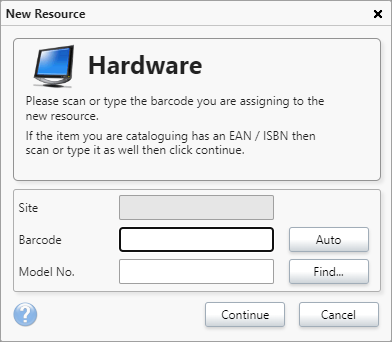
Add the barcode and the item's Model number if it has one and click 'Continue'.
Once the resource record card appears, click in each field and add information as required. Some of the boxes will allow you to select from a list of previously entered information, the rest are free type fields.
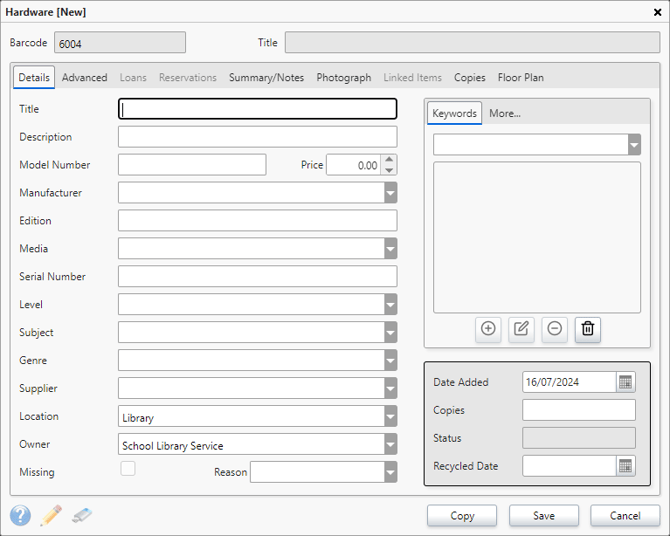
Click 'Save' to add this resource to the system.
Please note that Hardware resources cannot be marked as reference only. The Hardware resource type can have it's own restrictions set.
How some of our other customers have phrased this
- How do I add school laptops to the resource table?
Is it possible to add tablets and other similar items to Reading Cloud?
Get the most out of Reading Cloud with our flexible training packages delivered at a level and pace that suits your needs. Find out more.