
Purpose
To give information on the usage of the Current Loans table and the functions available within it.
Covers: Viewing Current Loans, searching through active loans, returning and renewing loans
Does not cover: Issuing resources, Past Loans
Instructions
The Current Loans table in Management is where you can track and manage all your current and overdue loans. From here you can print lists of loans and send reminders to the borrowers.
To access the Current Loans table, load the Management page and select Current Loans on the left of the screen.
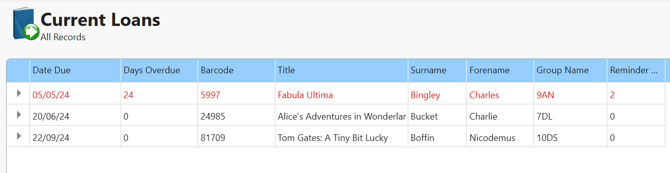
From here you can fully monitor all resources currently on loan. You can use the quick or advanced search feature to filter the page, and then use the blue bar at the top of the page to sort the records as you wish. You can search by the resource title, or by the Borrower name.
By default, the resource name and the Borrower name are listed. This enables you to search for either the forename / surname of a borrower, or the book title. If multiple entries exist for your search query, all will be listed. This allows you to see all loans for a specific individual or group. This will also tell you if multiple copies of a specific resource are on loan, and who has them.
If there is a format you would like to use regularly, you can also create a page view so you have something to back to regularly. You can then print the records showing on screen if you require some form of report.
Returning Items in Current Loans table
For convenience, it is possible to return items directly from the current loans table in management as well as from within circulate.
Find and click on the loan record that is to be returned so it is highlighted then click 'Return' from the 'Records' toolbox on the right-hand of the screen.
A prompt will display asking you to confirm if the selected item should be returned.
Click 'Yes' to confirm. The resource will now be returned.
You can also select multiple items at once using flagging, and then click return. This will return each of the loans selected. This can be used for any resource type (books/hardware etc.).
Renewing via Current Loans table
It is also possible to renew loans through the Current Loans table. Locate the loan you wish to renew - through Quick or Advanced Search.
Once the appropriate loan record has been found and selected, click the 'Renew' option on the right in the 'Records' box.
A box will appear, allowing you to select the new due date: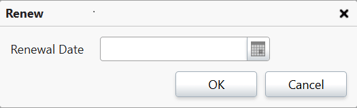
The date can be manually typed in, or click the Calendar icon to open up a calendar to select a date. When the date has been input, click 'OK' and the renewal will be complete.
You can also renew multiple items at the same time using flagging, however this will set the same due date for all loans selected. To set different returns dates the items must be renewed individually.
Other functions available
From the Current Loans Table you can print a list of all outstanding loans using the 'Print' option. If you wish to produce reminders for these outstanding items for specific borrowers, or whole Tutor Groups then you can create individual or group reminders manually. These can be either emailed directly to the borrowers, or generated as a PDF and then printed off to be posted or handed to the borrowers directly.
You can also mark items that have not been returned as missing, and remove the loan at the same time. This is done using the 'Missing' option.
You can also filter the records shown with differing criteria using the Views function.
How some of our other customers have phrased this
- Where can I see all outstanding loans?
- Where can I find details of overdue books?
- What can I do on the Current Loans table?
- How do I find out who has a particular book?
- How can I return all outstanding books?