
Purpose
This article gives information on how data tidy can be used within the Library site
Covers: Data tidy and settings
Does not cover: Quick replace, cataloguing or removing resources
Instructions
When adding resources or borrowers into your library website, especially if more than one librarian has been involved, there may be differences in the way in which some words have been entered into each field. Rather than finding and editing each individual record, you can use Data Tidy to apply the settings of your choice to both previously entered records and any that are entered in the future.
To begin, log into the library system then load Management and ensure that the appropriate table is on screen. For example, if changes are being made to resources, the 'Resources' table must be opened.
Once the appropriate table has been opened, select 'Tools' from the menu bar on the right of the screen and then select 'Data Tidy...'.
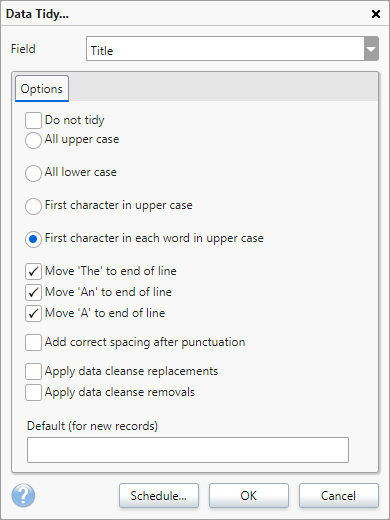
Use the 'Field' box to select the field to be tidied, then tick the Data Tidy options required. Repeat this for each field to be tidied.
If there is a tick in the 'Do not tidy' box then you will need to untick this for the field to be tidied. If you do not want to tidy a field, tick the 'Do not tidy' box. Click 'OK' when finished.
The 'Default (for new records)' will allow you to set a a specific value to appear in the current selected field. Use the menu to select which field you would like to set the default for and enter in the required value at the bottom of the page. For example, you could use this with the 'Owner' or Locations field, so that each resource has a specific value included by default.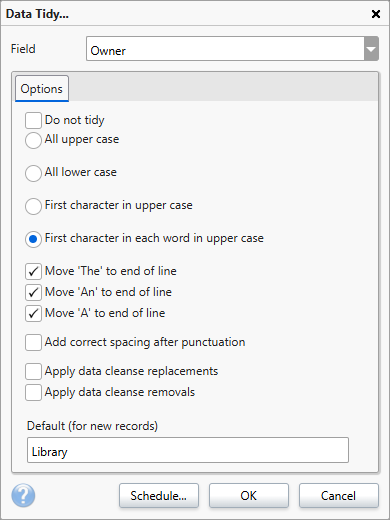
Data Tidy is also the way to apply your Data Cleanse Replacements and Removals.
When any future records are added to the database, they will have the Data Tidy settings applied to them when the 'Save' option is clicked.
Click 'Schedule' to view the Data Tidy scheduled task settings and next run options.
How some of our other customers have phrased this
- What is Data Tidy?
- Can I add a default owner or location to new resources?