
Purpose
To give instruction on the options available with Tutor Group records, and how these can be edited
Covers: Editing tutor group details
Does not cover: Removing a tutor group, adding borrowers to a Group
Instructions
If changes such as the Group Name or Year Group are made to a Tutor group, these alterations will also be reflected in borrowers on the respective record.
To make changes to the details of a Tutor group record, open the Tutor Groups database from the left menu in Management. Alternatively, click Database / Tutor Groups from the menu at the top of the management page.
Double click on the appropriate record or single click and then click Edit on the right hand side.
The tutor groups record card will open displaying the information that is currently stored for that group.
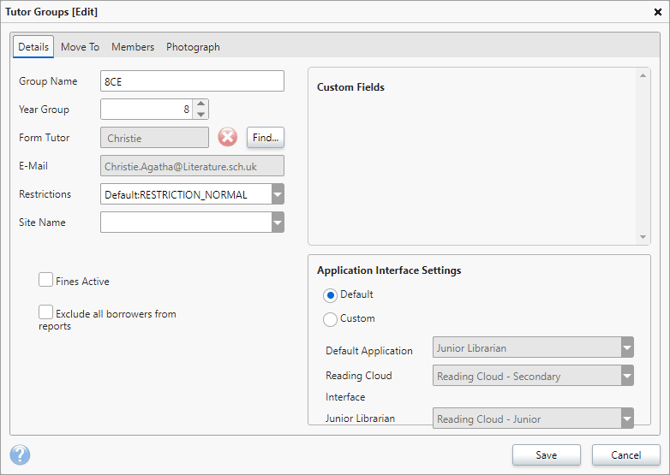
Alterations can be made by altering the data in any of the editable fields for Group Name, Year Group, default restriction group and site assignment. You can also assign a form tutor.
Once changes have been made, click Save to retain them.
If you wish to add individual students from a Tutor Group from another class, or remove them from a certain group, this must be done by changing the assigned Group name in their individual Borrower record as there is no facility to change members of a group through the Tutor Group itself.
If the Year Group is greyed out click on the Members Tab and check the Year Groups for the Borrowers, one or more will be different. When these Borrowers have been found they can be searched for and edited in the Borrowers table. Once their year group is corrected and matches the rest of the group, the Year Group field in the Group record will be editable.
How some of our other customers have phrased this
- How can I change a tutor group name?
- How do I add a student to a tutor group?
- Can a borrower be removed from a tutor group?