
Purpose
To provide information on the 'Memo' type Reminder
Covers: Memo type and it's potential usage
Does not cover: Group reminders, statements
Instructions
To access the area you can view and modify the reminder templates you will first need to access ‘Management’ then select 'Settings' at the top of the page, then 'Reminders & Statements'.
You'll then need to change the drop down to Memo.
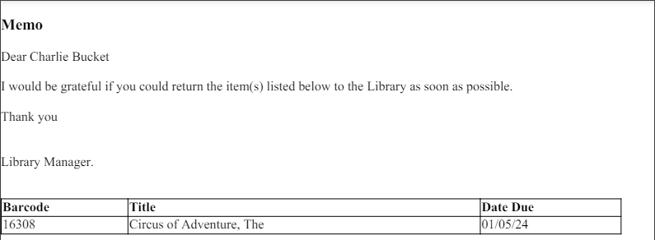
A memo is a reminder that can be sent to a selection of borrowers without affecting the reminder number in the Current Loans table. It can also be used to alert borrowers of news or upcoming events.
Any individual reminder or message that is required outside of the normal set reminders should be created as a memo.
A common usage for the memo is a reminder to students prior to them leaving School. A memo would remind them to bring all of their resources back to the library regardless of whether they are overdue or not without affecting their reminder number. This could also be used to update students about changes to Library opening hours, or to share details about an upcoming event in the Library.
Editing a memo reminder is exactly the same as editing any other reminder.
Memos, like individual reminders, group reminders and statements can be either emailed or printed.
How some of our other customers have phrased this
- How can I send messages to students through Reading Cloud?
- Is there a way to send different, extra reminders to students?
- Can I email students who are about to leave to remind them to return all their books?
Get the most out of Reading Cloud with our flexible training packages delivered at a level and pace that suits your needs. Find out more.