
Purpose
To detail the settings available regarding the New Arrivals and Most Popular.. homepage sections
Covers: New Arrivals & Most Popular homepage settings
Does not cover: Reporting on the database, checking loan history
Instructions
To alter your New Arrivals and Most Popular resources you will need to first log in and load the Management area.
Select 'Tools' at the top of the page, and choose 'New Arrivals & Most Popular...' from the list that appears. Then select the 'Most Popular' tab.
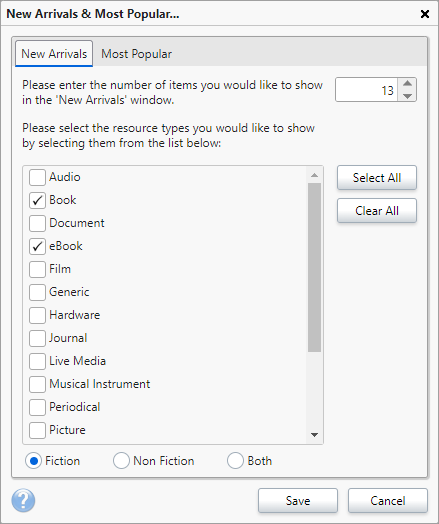
Make your selection from the first box. For New arrivals, this is how many you would like to show. For Most Popular, it is the number of days over which the top resource items will be calculated. This period is based on the days since a resource was issued, not returned.
Use the check boxes to tick which resource types to include.
Select whether the resources should be fiction, non fiction or both.
Click 'Save' once finished to save the changes.
To see the changes, you will need to refresh the homepage.
How some of our other customers have phrased this
- Can I edit what appears in the Most Popular section?
- I only want New Arrivals to show fiction resources
- Where are the settings for New Arrivals on the homepage?
Get the most out of Reading Cloud with our flexible training packages delivered at a level and pace that suits your needs. Find out more.