
Purpose
To detail the options available within the Summary/Notes tab within a Resource Record card
Covers: Summary, Public Notes and Notes options within resource record card
Instructions
The Summary and Notes Tab of the record card shows the summary of the resource, along with two different types of notes.
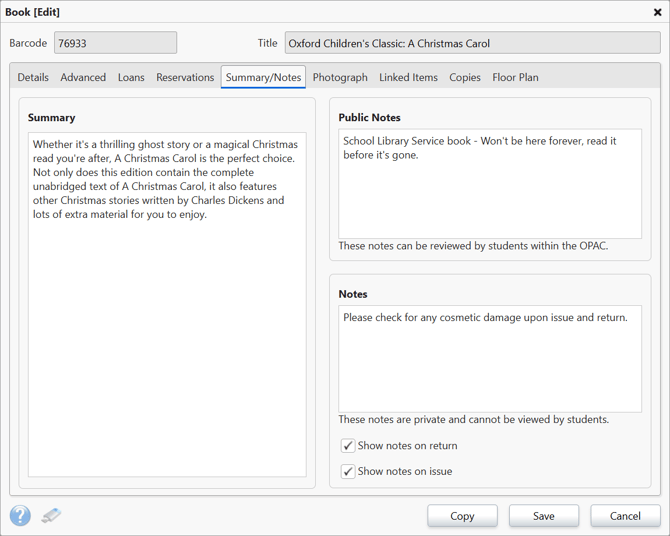
Summary
The summary section is used to store a brief summary of the resource, in many instances this could be the blurb on the back cover.
You may find that this section is automatically populated when you catalogue the resource, but it can also be edited freely if you wish to tweak or add to it.
Public Notes
The Public Notes section is where you can add notes for borrowers to read from the homepage when browsing this resource. This can be used to inform the borrowers of anything they may need to know before borrowing the resource, or to encourage them to do so.
Notes
The notes section is used to create a note that will appear in circulate when the book is either issued or returned, depending on which boxes you ticked.
Note that these notes will appear in all versions of circulate, no matter which version you use, including junior circulate when unlocked and used by students. So make sure no sensitive information is entered here.
How some of our other customers have phrased this
- How do I add notes to a resource?
- Can the summary for a book be edited?
- Can notes be added to a book that appear when it is returned?