
Purpose
To provide detail on the Discovery Online task, and the options associated with it
Covers: Discovery Online task settings
Does not cover: Cataloguing resources
What is Discovery Online?
Discovery Online (DOL) is the name given to an online database that holds millions of book cover images as well as over 700,000 summaries and bibliographic data, provided by Nielsen BookData. Using DOL will add all this to your resource database.
When the catalogue is searched, a picture of the front cover and/or summary can appear on screen. Discovery Online will also automatically find the bibliographic details of new resources added to the catalogue and will open up retroactive cataloguing to a much wider range of users beyond educational establishments. It will automatically fill in any gaps in field entries in the catalogue. Please note that while Neilsen's database is extensive, there are some ISBNs which may not be included in their dataset and therefore, their data may not appear when cataloguing.
Instructions
Catalogued records can be updated using the 'Discovery' scheduler task. This can help you ensure that any required available information for the resource is added, like the summary and any necessary keywords. This data can help your borrowers find and decide on what they wish to read next.
Once the task has been setup, it will run on a regular basis, but can also be run manually. We recommend you check the settings before scheduling the task so that you can specify what will be updated.
To set the task up, first load the Management page of your library system then select 'Schedule' from under 'Tools' on the right-hand side of the screen. Next select the pencil icon on the same line as 'Discovery' to open the settings box.
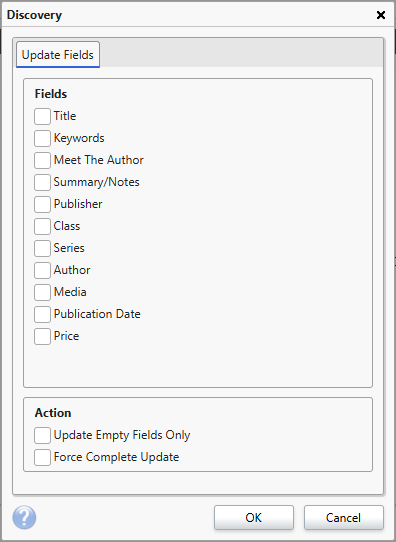
This screen allows you to select which fields will be updated. The settings here only affect resources retroactively, it is not possible to change what fields are brought onto a book record at the point of cataloguing.
Tick each of the fields that you wish to update. Each of the options map to fields within a book record (with the exception of the Meet the Author links which are stored internally).
The remaining two options under 'Actions' change aspects of how this task is run.
These options are 'Update Empty Fields Only' and 'Force Complete Update'.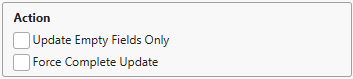
Ticking the 'Update Empty Fields Only' option will mean that Discovery Online will only update fields where there is no data currently present. In most circumstances you will want this option ticked because otherwise it has potential to overwrite data you have entered yourself. If you have a resource with no 'Publication Date' for example, with this option ticked, this value will be updated. However, if you had manually added a publication date and have this option un-ticked then when the task runs it will overwrite the date you added.
When 'Force Complete Update' is unticked, the Discovery Online task updates the catalogue records in batches each time it runs. With this option ticked, the task attempts to update all records in one go. Only tick this option if you are not going to be using your library system at the same time as the task is running as it will put a lot of strain on the performance of your system and may slow down the daily use of your library.
Click 'OK' to save the changes. These changes will only take effect when the 'Discovery' task has run via the scheduler. You will now need to schedule the task to run in order to make the changes to your resource catalogue.
Test Links for Discovery Online
Discovery online provide test links which allow you to check if there is resource data for your books in their database. All you need to do is copy the below link into the URL bar of a web browser, add the ISBN of the resource to the end and press 'Enter'.
Resource Data - https://bibliographicdata.blob.core.windows.net/isbn13/
Resource Image - discovery.microlibrarian.net/handler/imagehandler.ashx?type=0&isbn13=
If the link returns no data then unfortunately we do not have any information for that resource. If it does return data then this is the data that will be pulled into the record card when adding the book. If you are missing one specific piece of data, look through to see if it is there, if not, it will need to be added manually.
If the data or image is wrong then please check that the resource you are looking at is not part of a set. If it is part of a set then the books will likely all have the same ISBN but the data will only match one of them. In this instance the data needs to be added manually to the other books. However the resources need to be unlinked so that changing one does not change the others.
If the data is wrong and the book is not part of a set please let us know immediately by logging a support case. Please include the title, author and ISBN of the resource that you have in front of you so that we can check what the data should be and we will correct it right away.
How some of our other customers have phrased this
- What is Discovery Online?
- Can resource data be updated retroactively?
- Can I set which fields are updated by Discovery?