
Purpose
This article details how you can test the base configuration of your barcode reader
Covers: Testing Barcode Reader Configuration
Does not cover: Flag by Barcode, Cataloguing Resources or Ordering barcode readers
Instructions
If you are having issues scanning barcodes in your library system seeing errors such as:
- Junior Circulate - There is no book with this barcode
- Senior Circulate - Resource not found
It is important to know if there is anything wrong with your scanner before carrying out any changes. The way to do this is to open notepad on your computer and scan a barcode into it.
Start by opening notepad on your computer, click into the notepad so that the cursor is showing there. Now with the barcode scanner plugged into the same machine, scan any resource or borrower barcode you have to hand, even an ISBN.
What you want to see is a tilde symbol '~' followed by the barcode number and the cursor on the next line.
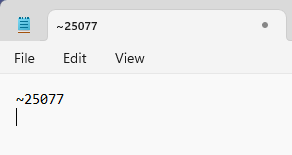
If the tilde symbol is missing or the cursor is not on the next line, the scanner needs to be reconfigured.
If everything is correct, the tilde symbol is there and the cursor has moved to the next line, your scanner may not need to be reconfigured. In that instance, the issue is likely either the format of the barcodes on the resource record cards, or the barcode masks.
Check to see if the barcode on the resource matches the resource record in Reading Cloud to see if there are any differences. If there are, you may need to edit the barcode masks to ensure nothing is being removed automatically.
How some of our other customers have phrased this
- How do I test the configuration of my barcode reader?
- What should I do if my scanner is not working in Management?
- Resources not found when scanning in Circulate