
Purpose
To give information on the Fines function within Reading Cloud
Covers: Fine rates, enabling or disabling fines, repayment or waiving of charges
Does not cover: General restrictions
Instructions
Not all libraries use fines but should you wish to institute these you must first set the fine rate, and then enable fines at the tutor group level.
Once these are enabled, the total fine is determined when a resource is returned. This is calculated based on the number of days the resource was overdue multiplied by the fine rate of the resource. For example, a resource with a fine rate of 10p that is 10 days overdue, when the resource is returned will have the fine of £1.00. This also applies if an overdue book is renewed. If a fine would be incurred, this will apply at the point of renewal.
Setting the Fine Rate
- To edit the general Fire Rate, this would be done through Resource Restrictions
- You can also set a fine rate on a resource itself using Lock Restrictions. A fine rate set this way will take precedence, and be used instead of the general fine rate if both are set.
Enabling or Disabling Fines
Once the fine rate has been set, the fines can be enabled or disabled as needed. This is done through the Tutor Groups.
Fines can be enabled/disabled by toggling the option on each Tutor Group. If the 'Fines Active' box is unticked, fines will not be generated for any Borrowers that belong to that Tutor Group (regardless of the restriction settings).
Log into your library site and load Management then select 'Tutor Group' in the left-hand menu.
Select the required Tutor group and click 'Edit' from the right-hand menu to open the tutor group record, place a tick in the ‘Fines Active’ box.
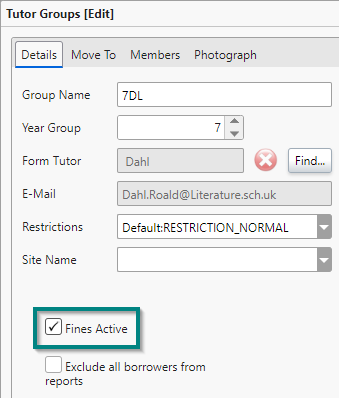
Click 'Save' to commit the changes to the Tutor Group.
You can then repeat these steps for each Tutor Group that you want to activate or deactivate fines for. This means you can set fines to only apply to specific Tutor Groups if you need.
Enabling fines will mean that any loan that is issued from this point will incur a fine if it becomes overdue. This does not retroactively apply to items already issued.
Repayment or Waiving Fines
Repayment or waiving of fines is done through Circulate, via the statements tab.
Statement Reminder
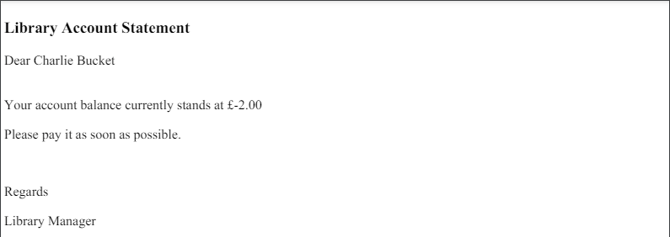
The best way to let a borrower know of any outstanding fines on their account is to generate a reminder, normally a Statement reminder. A Statement is a letter advising a borrower that they currently have a negative amount on their account and urges them to bring this payment to the appropriate person.
Editing a Statement is the same as editing any other reminder.
Statements, like individual reminders, group reminders and memos can be either emailed or printed.
FAQs
Q - We don't use fines in our school for late books, but is it still possible to charge for lost or damaged books?
A - Yes, charges can still be made. This can be done either through Circulate in the Statement tab, or if you mark a loan as missing through Circulate, or Management, there is an option to add a replacement cost.
Q - Can I send a reminder of any outstanding balance to pupils?
A - Yes, a statement can be generated and sent like any other reminder. When selecting the reminder type - ensure that 'Statement' is selected.
How some of our other customers have phrased this
- Can I add fines for late books?
- How do I enable fines?
- Can I enable fines for only some Tutor Groups?
- Where do I set the fine rate?
- How can I let students know how much they owe the library?