
Purpose
To show how the Print feature in 'Tools' can be used in Management
Instructions
You can use the print feature to generate a print-out from any of the tables within the system.
You may wish to use this to print a list of resources that need to be looked for, or as a list of resources to explain what books are on what shelves. You may need to print a list of all borrowers in certain groups or sets for use in lessons.
By default, when you click 'Print', the system will include all resources that are shown in the view currently shown. To print a specific set of resources, you must first filter using flagging (either Flag by Barcode or Flag by Mouse), Quick Search or Advanced Search. Note that the columns generated in the printout are the ones that display on screen. To print a different selection of columns, you must first amend the columns that show in the view using a page view.
When you have selected the resources you wish to generate a printout for, click 'Print' on the right-hand menu.
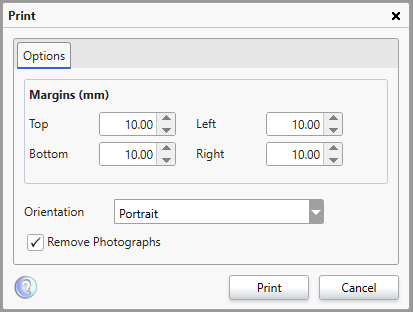
- Margins - These settings define how much of a gap is created between the edge of the page and the printed information. Keep in mind that if these settings are too low, you may lose some information when sending it to the printer.
- Orientation - This box allows you to swap between Portrait (Upright) and landscape (sideways).
- Remove Photographs - When printing in the resources table. This will include a small copy of the resource cover if included in the resource record. This cannot be resized.
Select the desired options and click 'Print' when ready.
For ease of use, the printout will be generated as a PDF document. You can send the PDF document to the printer or save it to your machine.
Should you wish to have this in another format, you should use the Export function instead.
How some of our other customers have phrased this
- How do I print a class list?
- Print out current loans
- Can I print out the the information shown in the table currently?
- Can I run a report to include student name, barcode and date of birth?