
Purpose
To detail the features of the Copies tab in resource record cards
Covers: Copies tab in the Resource record card
Does not cover: Details tab, Loans tab, Reservations tab, Summary/Notes tab
Instructions
The Copies tab of the record card shows any exact copies of the current resource. If you have multiple resources with the same ISBN they will show in this list, regardless of how you have added them.
Items with a different ISBN will not display here, as they are regarded as a separate resource.
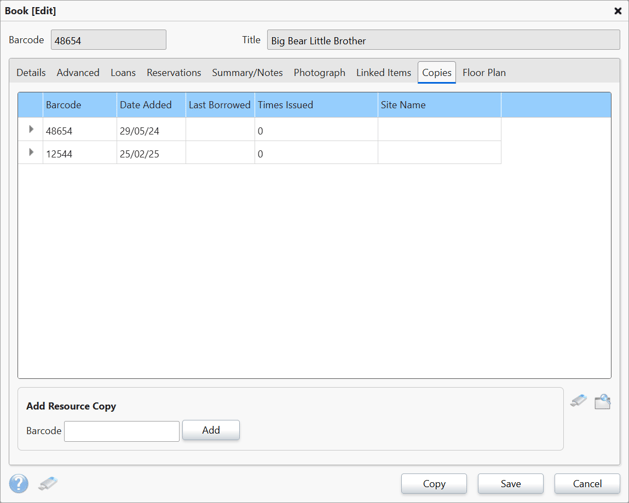
You can use the copy feature to add more resources via the 'Add Resource Copy' feature at the bottom of the record card.
Keep in mind that when editing the information on a resource, the information on any copies will also be changed, with the exception of the 'Price' field. The 'Price' field is unique to each resource, cannot be updated in this way. To update the price for multiple resources, the Quick Replace tool can be used.
Be aware that if you use the 'Unlink Resource' button on the Advanced Tab to separate a resource from the others, it will no longer show in this list and cannot ever be relinked.
If you wish to export this list, you can do so by pressing the image of a USB pen drive icon. You can also tweak the view of this table by selecting the page view icon.
How some of our other customers have phrased this
- What is the Copies tab for?
- Can I view how many copies I have in the resource record?
-